Executive Summary
During my industrial training (internship) at the university’s central ICT department, my supervisor assigned me the full deployment lifecycle of a dedicated, campus-wide Moodle Learning Management System (LMS). The deployment centralizes academic resources across multiple faculties and replaces legacy, fragmented services.
Rather than using virtualized resource slices, I architected and deployed the system directly on bare-metal enterprise rack hardware: a Dell PowerEdge R420. The entire implementation ran through the headless Linux CLI and was secured with industry-standard hardening, least-privilege access controls, and automated operational pipelines.
1. Hardware Provisioning & Physical Telemetry
Enterprise Server Baseline
The platform was provisioned on dedicated rack-mounted enterprise hardware:
- Server Chassis: Dell PowerEdge R420 (Dual-socket Intel Xeon architecture, Redundant Power Supplies)
- Storage Subsystem: Dual 10,000 RPM enterprise SAS drives (Toshiba AL13SEB300, 300GB each) driven by an integrated PERC hardware RAID controller
- Memory Architecture: 16GB DDR3 ECC Registered Memory
+--------------------------------------------------------------+
|                     Dell PowerEdge R420                      |
|  [Dual Intel Xeon]   [16GB ECC RAM]   [Redundant PSUs]       |
+--------------------------------------------------------------+
         |                                     |
         v                                     v
+------------------+                 +--------------------+
|  PERC Controller |                 |    iDRAC Out-of-   |
|   (SAS RAID 1)   |                 |   Band Management  |
+------------------+                 +--------------------+
         |
         v
+--------------------------------------------------------------+
| Logical Volume Manager (LVM)                                 |
|  ├── /dev/sda2: /boot (2 GB)                                 |
|  └── /dev/sda3: / (100 GB Root System)                       |
+--------------------------------------------------------------+
Pre-Installation Firmware & Drive Health Triage
Before OS installation, I used iDRAC out-of-band management to verify hardware event logs (SEL), power supply redundancy, and thermal thresholds.
Drive integrity was audited with smartctl (smartmontools suite) over the SAS transport interface:
# Deep SAS SMART health inspection
sudo smartctl -a /dev/sda
- SMART Health Status:
OK(0 uncorrected read/write errors) - Operating Temperature: Stable at 35°C
- Background Diagnostic: Extended self-test completed with zero defect list growth.
Volumes were partitioned with Linux Logical Volume Manager (LVM), separating the root filesystem (/) from boot so storage can expand dynamically without downtime.
2. Base Operating System Hardening & Networking
The server runs a minimal Ubuntu Server LTS installation with no graphical desktop environment, reserving compute cycles for database transactions and web worker threads.
Administrative Access Hardening
Remote administration uses SSH key-pair authentication only, which removes password brute-force exposure:
# Generate high-entropy Ed25519 key on admin workstation
ssh-keygen -t ed25519 -C "admin-infra"

# Install public key and restrict daemon
ssh-copy-id -i ~/.ssh/id_ed25519.pub -p <SSH_PORT> <SSH_USER>@192.0.2.10
In /etc/ssh/sshd_config, password authentication and root login are disabled:
PermitRootLogin no
PasswordAuthentication no
X11Forwarding no
MaxAuthTries 3
Network Topology & Static Addressing
Netplan (/etc/netplan/00-installer-config.yaml) provides static addressing for deterministic DNS resolution and consistent firewall pass-through:
network:
  version: 2
  ethernets:
    eno1:
      addresses:
        - 192.0.2.10/24
      routes:
        - to: default
          via: 192.0.2.1
      nameservers:
        addresses:
          - 8.8.8.8
          - 1.1.1.1
Firewall Architecture (UFW)
The Uncomplicated Firewall (UFW) enforces a strict default-deny perimeter policy:
sudo ufw default deny incoming
sudo ufw default allow outgoing
sudo ufw allow <SSH_PORT>/tcp comment 'Hardened SSH Port'
sudo ufw allow 80/tcp comment 'HTTP Web Traffic'
sudo ufw allow 443/tcp comment 'HTTPS Encrypted'
sudo ufw enable
3. LAMP Stack Architecture & Performance Tuning
The application stack consists of Apache 2.4, MariaDB 10.x, and PHP 8.x.
                   [ Client HTTPS Requests / Web Browsers ]
                          |
                          v
+---------------------------------------------------+
|               UFW Perimeter Firewall              |
|         (Allow: 80, 443, 2222 | Deny All)         |
+---------------------------------------------------+
                          |
                          v
+---------------------------------------------------+
|                     Apache 2.4                    |
|         (VirtualHost /var/www/html/moodle)        |
|          - mod_rewrite (Clean REST URLs)          |
|       - mod_headers (HTTP Security Headers)       |
+---------------------------------------------------+
                          |
                          v
+---------------------------------------------------+
|                   PHP 8.x Engine                  |
|     (Tuned: 512M Memory | 200M Upload Payload)    |
+---------------------------------------------------+
            |                           |
            v                           v
+-----------------------+   +-----------------------+
|        MariaDB        |   |    /var/moodledata    |
|   (utf8mb4_unicode)   |   |  (External Storage |  |
|      400+ Tables      |   |     Isolated Root)    |
+-----------------------+   +-----------------------+
Database Layer Provisioning
MariaDB was configured with utf8mb4 encoding to support full multilingual indexing and emoji rendering in course communications:
CREATE DATABASE moodle DEFAULT CHARACTER SET utf8mb4 COLLATE utf8mb4_unicode_ci;
CREATE USER 'moodle_admin'@'localhost' IDENTIFIED BY '<DB_PASSWORD>';
GRANT ALL PRIVILEGES ON moodle.* TO 'moodle_admin'@'localhost';
FLUSH PRIVILEGES;
PHP Runtime Optimization
Default PHP parameters routinely fail under concurrent classroom uploads and background cron executions. The php.ini runtime configuration was tuned for high-concurrency academic workloads:
| Directive | Factory Default | Tuned Value | Engineering Rationale |
|---|---|---|---|
memory_limit | 128M | 512M | Prevents Out-Of-Memory exhaustion during large course backup restorations. |
upload_max_filesize | 2M | 200M | Accommodates large engineering CAD, ZIP, and slide assignments. |
post_max_size | 8M | 200M | Matches POST buffer capacity with multi-file form uploads. |
max_execution_time | 30 | 300 | Eliminates script timeout aborts during heavy gradebook report calculations. |
max_input_vars | 1000 | 5000 | Prevents payload truncation on complex grading forms and large quizzes. |
4. Application Deployment & Filesystem Isolation
The stable production branch of Moodle was cloned directly into the document root with Git:
sudo git clone -b MOODLE_405_STABLE https://github.com/moodle/moodle.git /var/www/html/moodle
Filesystem Security & Path Isolation
Following web application security standards, user uploads, dynamic sessions, and caches were isolated entirely outside the exposed web root:
- Public Web Root:
/var/www/html/moodle(Permissions:755, owned bywww-data:www-data) - Private Dynamic Data Store:
/var/moodledata(Permissions:770, strictly owned bywww-data:www-data)
Keeping moodledata outside the document root ensures that uploaded files, whether student assignments or malicious payloads, can never be executed directly through an HTTP request URL.
Reproducible CLI Installation
Instead of the stateful browser-based wizard, I ran the installation through Moodle’s native administrative CLI:
sudo -u www-data /usr/bin/php /var/www/html/moodle/admin/cli/install.php \
  --lang=en \
  --wwwroot=https://lms.example.com \
  --dataroot=/var/moodledata \
  --dbtype=mariadb \
  --dbhost=localhost \
  --dbname=moodle \
  --dbuser=moodle_admin \
  --dbpass='<DB_PASSWORD>' \
  --fullname="Institutional LMS Portal" \
  --shortname="LMS" \
  --adminuser='<ADMIN_USER>' \
  --adminpass='<ADMIN_PASSWORD>' \
  --non-interactive \
  --agree-license
5. Automation, Maintenance & Disaster Recovery
Asynchronous Task Execution (System Cron)
Moodle needs continuous background processing for gradebook recalculations, email dispatches, and course backups. I delegated this work to the Linux system cron daemon instead of web requests:
# Append to www-data crontab
sudo crontab -u www-data -e

# Run maintenance runner every minute
* * * * * /usr/bin/php /var/www/html/moodle/admin/cli/cron.php >/dev/null 2>&1
Database Backup Pipeline with Retention
To support business continuity, an automated shell script creates timestamped database exports and purges those older than 14 days on a rolling basis. Database credentials are read from a root-owned option file (mode 600) rather than passed on the command line, so they never appear in the process list or shell history:
#!/bin/bash
umask 077
BACKUP_DIR="/var/backups/moodle-db"
TIMESTAMP=$(date +"%F_%H-%M-%S")
mkdir -p "$BACKUP_DIR"

# Generate compressed logical dump (credentials supplied via protected option file)
mysqldump --defaults-extra-file=/etc/moodle-backup/db.cnf moodle | gzip > "$BACKUP_DIR/moodle_db_$TIMESTAMP.sql.gz"

# Enforce 14-day retention cycle
find "$BACKUP_DIR" -type f -name "*.sql.gz" -mtime +14 -delete
A dedicated logrotate policy in /etc/logrotate.d/apache2 rotates access and error logs daily with gzip compression to control log growth.
6. Functional Verification, Performance Benchmarking & Auditing
Concurrency Stress Testing (ApacheBench)
To validate stability under peak login spikes, I ran synthetic load tests with ApacheBench (ab): 100 requests at a concurrency level of 10:
Server Software:        Apache/2.4.x
Server Port:            80
Document Path:          /
Document Length:        1484 bytes

Concurrency Level:      10
Time taken for tests:   0.132 seconds
Complete requests:      100
Failed requests:        0
Total transferred:      173700 bytes
HTML transferred:       148400 bytes
Requests per second:    759.51 [#/sec] (mean)
Time per request:       13.166 [ms] (mean)
Time per request:       1.317 [ms] (mean, across all concurrent requests)
Transfer rate:          1288.35 [Kbytes/sec] received

Connection Times (ms)
              min  mean[+/-sd] median   max
Connect:        0    0   0.2      0       1
Processing:     5   12   3.3     12      20
Waiting:        5   11   3.1     11      20
Total:          6   12   3.3     12      20
- Zero Failed Transactions: All concurrent requests completed successfully.
- Sub-14ms Latency: Mean latency per request was 13.16 ms, well within institutional SLA thresholds.
- High Transaction Velocity: Achieved ~760 requests per second on bare-metal hardware.
Cross-VLAN Routing & Latency Verification
ICMP echo tests and hop-trace diagnostics confirmed Layer-3 reachability across distributed campus subnets:
C:\Users\<user>>ping 192.0.2.10
Pinging 192.0.2.10 with 32 bytes of data:
Reply from 192.0.2.10: bytes=32 time=5ms TTL=62
Reply from 192.0.2.10: bytes=32 time=5ms TTL=62
Reply from 192.0.2.10: bytes=32 time=7ms TTL=62
Reply from 192.0.2.10: bytes=32 time=5ms TTL=62

Ping statistics for 192.0.2.10:
    Packets: Sent = 4, Received = 4, Lost = 0 (0% loss),
    Approximate round trip times in milli-seconds:
    Minimum = 5ms, Maximum = 7ms, Average = 5ms
Post-Deployment Verification Checklist
| Operational Component | Verification Command / Target | Success Criteria | Status |
|---|---|---|---|
| Web Service Connectivity | curl -I http://localhost | HTTP 200 OK via Apache runtime listener | PASSED |
| Automation Persistence | crontab -u www-data -l | CLI cron active on 1-minute schedule | PASSED |
| Firewall Enforcement | sudo ufw status verbose | Ingress ports restricted to SSH/Web | PASSED |
| Directory Isolation | /var/moodledata | www-data ownership with restricted root | PASSED |
| Database Integrity | mariadb-check -u root -p --all-databases | Zero orphaned schemas or table corruptions | PASSED |
| Log Rotation Cycle | /etc/logrotate.d/apache2 | Daily rotation enforced with 14-day TTL | PASSED |
Production Deployment Success

LMS dashboard rendering successfully after the bare-metal provisioning and network isolation phases.
7. Experimental Integration & Rollback Decision: Local AI (Ollama)
To introduce AI-assisted learning features to the LMS, I ran a Proof of Concept (PoC) integrating a local Large Language Model (LLM) through Ollama directly on the server.
During testing, the Dell PowerEdge R420’s hardware constraints (CPU-only inference, 16GB ECC RAM, and no dedicated GPU) caused severe processing bottlenecks. AI response latency was unacceptably high, and inference drove CPU utilization high enough to threaten the responsiveness of the core Moodle web server.
Hardware Telemetry During AI Inference
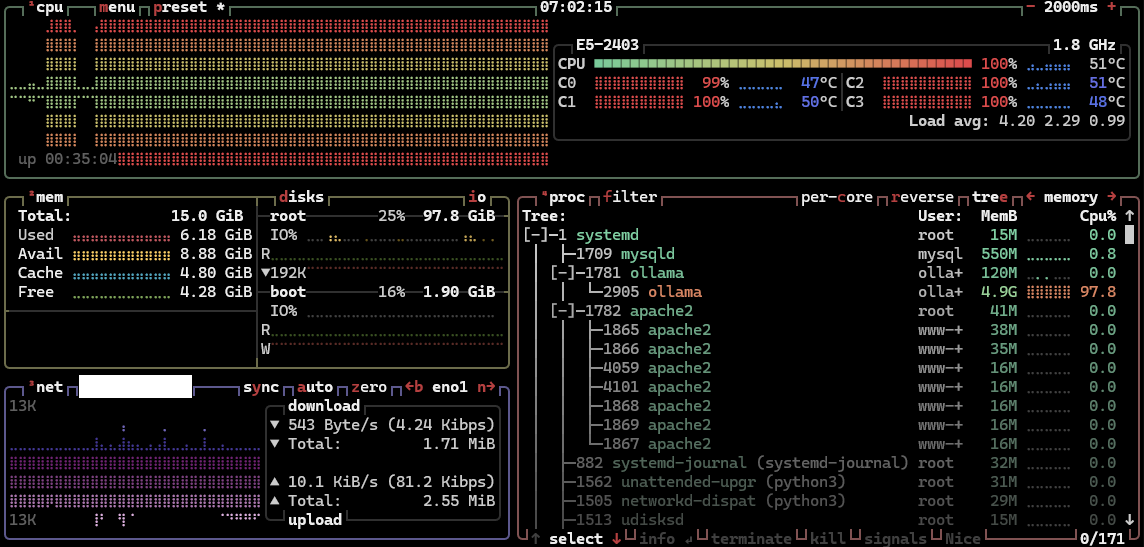
Resource monitoring over SSH showing the ollama daemon consuming 97.8% of CPU cycles and starving the Apache and MariaDB worker threads on the Xeon E5-2403 processor.
Engineering Decision: I aborted the AI integration and rolled the server back to its baseline configuration. In production, core platform stability, reliable uptime, and a seamless user experience take priority over experimental features.
Key Takeaways & Operational Impact
- Bare-Metal Performance Efficiency: Removing the hypervisor layer eliminated virtualization I/O overhead and gave the workload dedicated access to physical SAS spindles and raw CPU cycles during assessment submission spikes.
- Security by Default: Strict isolation between web assets and dynamic data stores removes the primary attack vector of unauthenticated arbitrary file uploads.
- Reproducibility Through CLI: Capturing the stack in shell scripts and CLI installation flags lets any future hardware refresh or cold-site recovery be orchestrated in minutes rather than hours.